


问题
昨天晚上,我在windows电脑上配置python爬虫的框架scrapy时,一直在报错:
ImportError: DLL load failed while importing _rust: 找不到指定的程序。我尝试分别在cmd、pycharm的终端中使用命令“pip install scrapy==2.6.3”(学习需要限定该版本),下载过程很顺利,可一旦输入命令“scrapy”就报错!
我又尝试用deepseek满血版(一种AI),它给出的解决方式有很多,比如下载微软的vc++、升级python版本;但都没有用。对此我想说一句,AI的知识面确实很广(感觉什么都知道一点),但它的知识深度还远远不够,稍微专业一点的问题就解决不了(可能是因为它没有专业领域的数据投喂吧)。
解答
第二天早上,我阅读了scrapy的官方文档后,终于解决了问题。解决方法如下:
1.确保你的电脑已经安装了Conda或Miniconda。
2.使用Miniconda创建一个虚拟的python环境,命令如下:
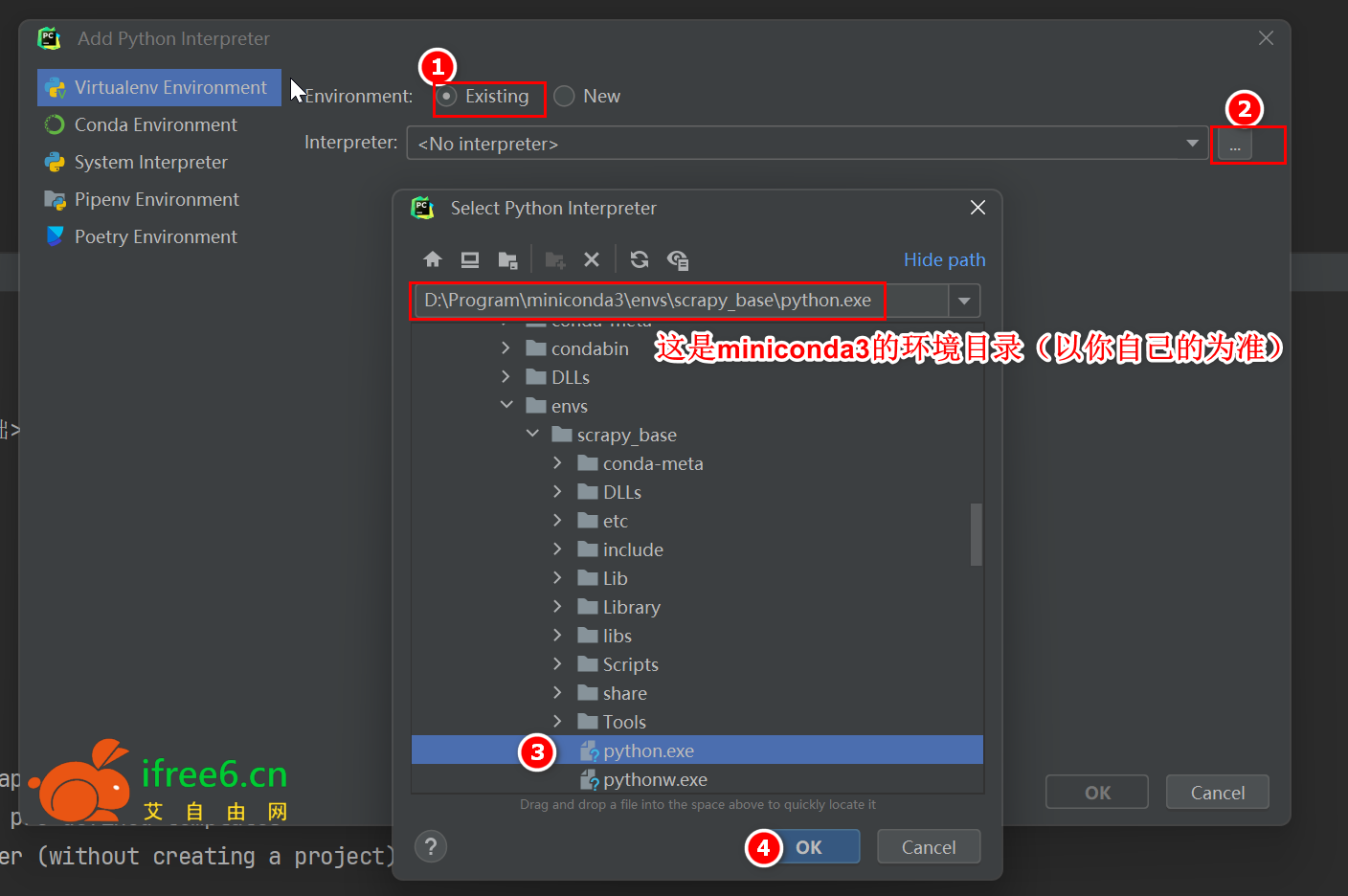
conda create -n scrapy_base python==3.9然后在Pycharm中添加该虚拟环境:
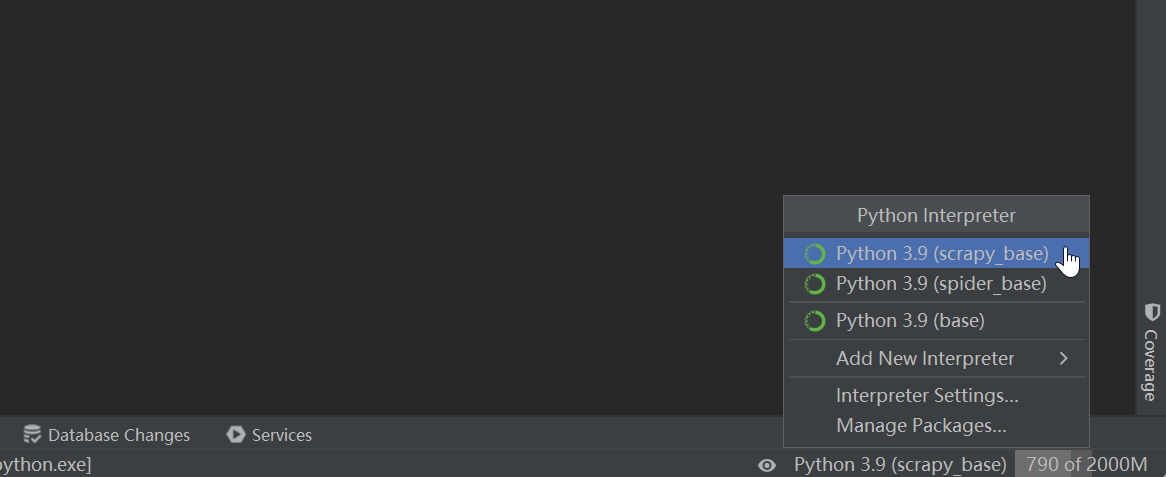
最后切换到上面创建的虚拟环境(scrapy_base):
3.在Pycharm的终端(Terminal)中输入以下代码:
# 最后面是版本号,如果不需要可删除
conda install -c conda-forge scrapy==2.6.34.等待代码跑完(途中可能需要y确认),在终端中输入“scrapy”,显示如下内容则表示安装成功:
(scrapy_base) D:\CODE\python_code\爬虫基础>scrapy
Scrapy 2.6.3 - no active project

Usage:
  scrapy <command> [options] [args]

Available commands:
  bench         Run quick benchmark test
  commands
  fetch         Fetch a URL using the Scrapy downloader
  genspider     Generate new spider using pre-defined templates
  runspider     Run a self-contained spider (without creating a project)
  settings      Get settings values
  shell         Interactive scraping console
  startproject  Create new project
  version       Print Scrapy version
  view          Open URL in browser, as seen by Scrapy

  [ more ]      More commands available when run from project directory

Use "scrapy <command> -h" to see more info about a command
Scrapy官方文档:https://www.osgeo.cn/scrapy/intro/install.html#windows
常见问题:
1.不会下载文件?答:请查看下载帮助。
2.我应该下载哪个文件/软件? 答:通常“数字后缀”表示版本号(越大越新),下载数字最大的即可!
3.下载地址为什么隐藏了? 答:防止爬虫索引,敏感内容登录即可免费下载!
2.我应该下载哪个文件/软件? 答:通常“数字后缀”表示版本号(越大越新),下载数字最大的即可!
3.下载地址为什么隐藏了? 答:防止爬虫索引,敏感内容登录即可免费下载!
THE END





暂无评论内容